The full tour

Every feature, movement by movement.

Maestro is built against a public blueprint in two phases: the orchestration IDE, then the agent platform layer. Everything below is in that blueprint — labeled Available or In development so you always know what ships today.

Compose · Phase 1 Available

The canvas is the score.

Drag components from the palette — agents, model calls, routers, prompt templates, tools, conditions, loops, human approvals, MRGD decode, reward models, sub-workflows — and wire them with typed edges. Text ports don’t accept images; incompatible connections are refused on the spot, with the reason. A Problems panel catches unresolved references, cycles, and missing config before anything runs.

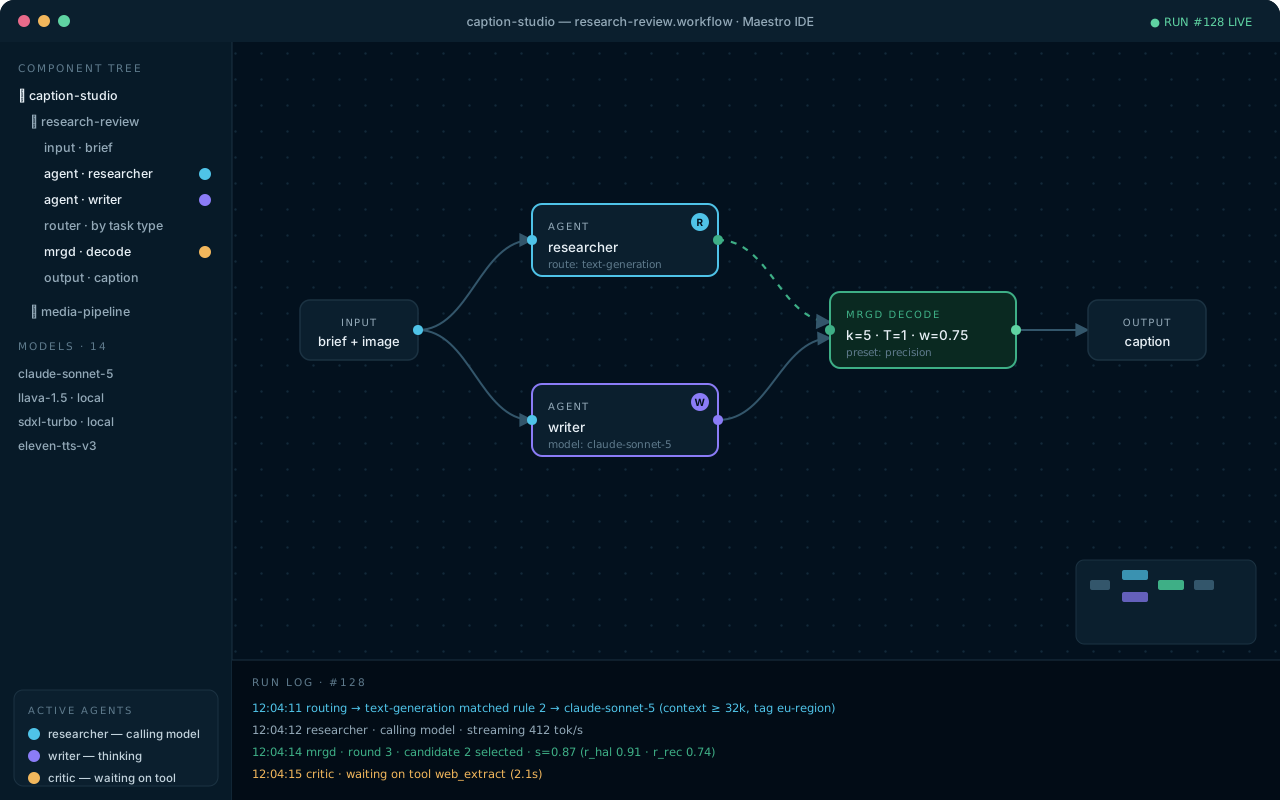
Maestro canvas: a captioning workflow running, with agent badges on active nodes, a component tree, and a streaming run log
A run in flight: pulsing nodes, animated edges, agent badges in both the canvas and the tree, and a routing decision explained in the log.

Live agent map

Each active agent carries a colored badge — violet thinking, cyan calling a model, amber waiting on a tool, orange waiting on you. With three agents running in parallel, you can say where each one is within two seconds. That’s an acceptance criterion, not a slogan.

Canvas ⇄ JSON, always in sync

Every workflow is a readable JSON file that git can diff. Edit on the canvas or in the built-in editor — both views are the same document, and invalid JSON is rejected with precise errors.

Sub-workflows & frames

Group nodes into collapsible frames, convert them into reusable sub-workflows, and compose systems from systems. Undo covers at least a hundred steps.

Route · Phase 1 Available

Unlimited models. One matrix.

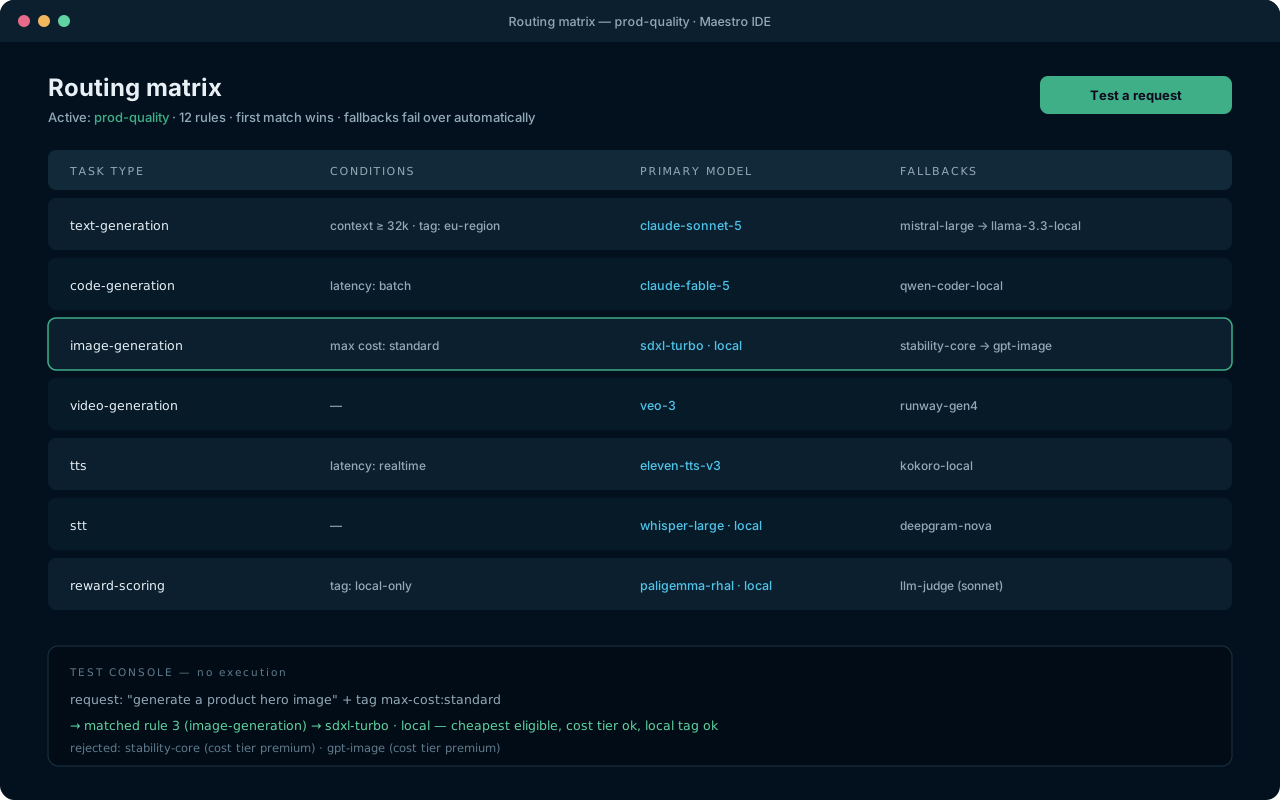
Register as many models as you like — hosted or local — and let the routing matrix decide which one handles each kind of task. Rules carry conditions (minimum context, cost tier, tags like local-only or eu-region) and ordered fallback chains that take over automatically when a provider fails.

Routing matrix: rules for text, code, image, video, TTS, STT and reward scoring, with a test console explaining a decision
The test console answers “which model would handle this?” — without spending a cent.

Any provider

Anthropic, OpenAI-compatible endpoints (OpenAI, Azure, Groq, Together, OpenRouter, vLLM, LM Studio…), Gemini, Ollama, ElevenLabs, Stability-style image backends — and a generic HTTP adapter for anything else, no code required.

Keys stay in the keychain

Credentials are entered once and stored only in your OS keychain. Project files, exports, and logs carry an opaque reference — never the key. Test any model’s connection with one click.

Cost-aware failover

Prefer the cheapest eligible model, or pin quality where it matters. Every failover is logged and shown — you always know which model actually answered.

Decode · Phase 1 In development

MRGD: quality you can steer at run time.

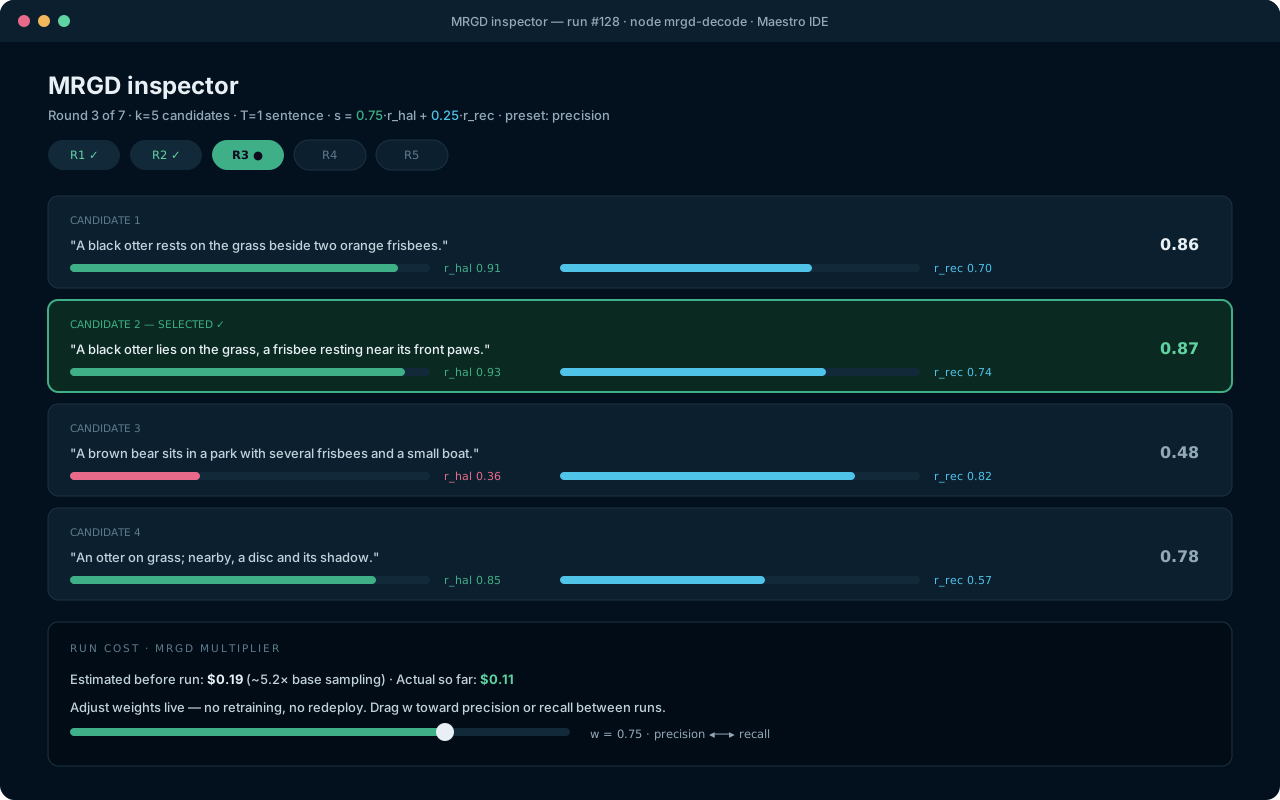
Maestro implements multimodal reward-guided decoding from the ICCV 2025 paper “Controlling Multimodal LLMs via Reward-guided Decoding”. Enable it on any generation node: the engine samples k candidate continuations every sentence, scores each with your weighted mix of reward models, keeps the best, and repeats. In the paper’s benchmarks this cut hallucinated objects by ~70% versus greedy decoding — and k=5 with sentence-level guidance beat best-of-30 rejection sampling.

MRGD inspector: five candidates with per-reward score bars, the selected candidate highlighted, and a runtime weight slider
Four scorer types: learned reward endpoints, programmatic object-recall, LLM-as-judge, and your own scripts.

Presets you can trust

Precision (w=1.0), Balanced (w=0.5), Recall (w=0.0) — with honest guidance that the best weight depends on your content, and A/B runs to find it.

Costs declared up front

MRGD multiplies generation cost by roughly k. Maestro estimates it before you run and reports actuals after — the trade-off is always yours to make.

Best-of-k for media

The same idea extends to images and audio: generate k artifacts, score each with a judge you choose, keep the winner, inspect the alternates. Clearly labeled as Maestro’s extension of the paper.

Observe · Phase 1 In development

Runs you can replay. Spend you can see.

Every run writes an append-only event log — prompts, responses, tool calls, routing decisions, reward scores, costs. Scrub through any historical run step by step, open any node’s inputs and outputs, and read the Gantt timeline to see what ran in parallel, what retried, and what failed over.

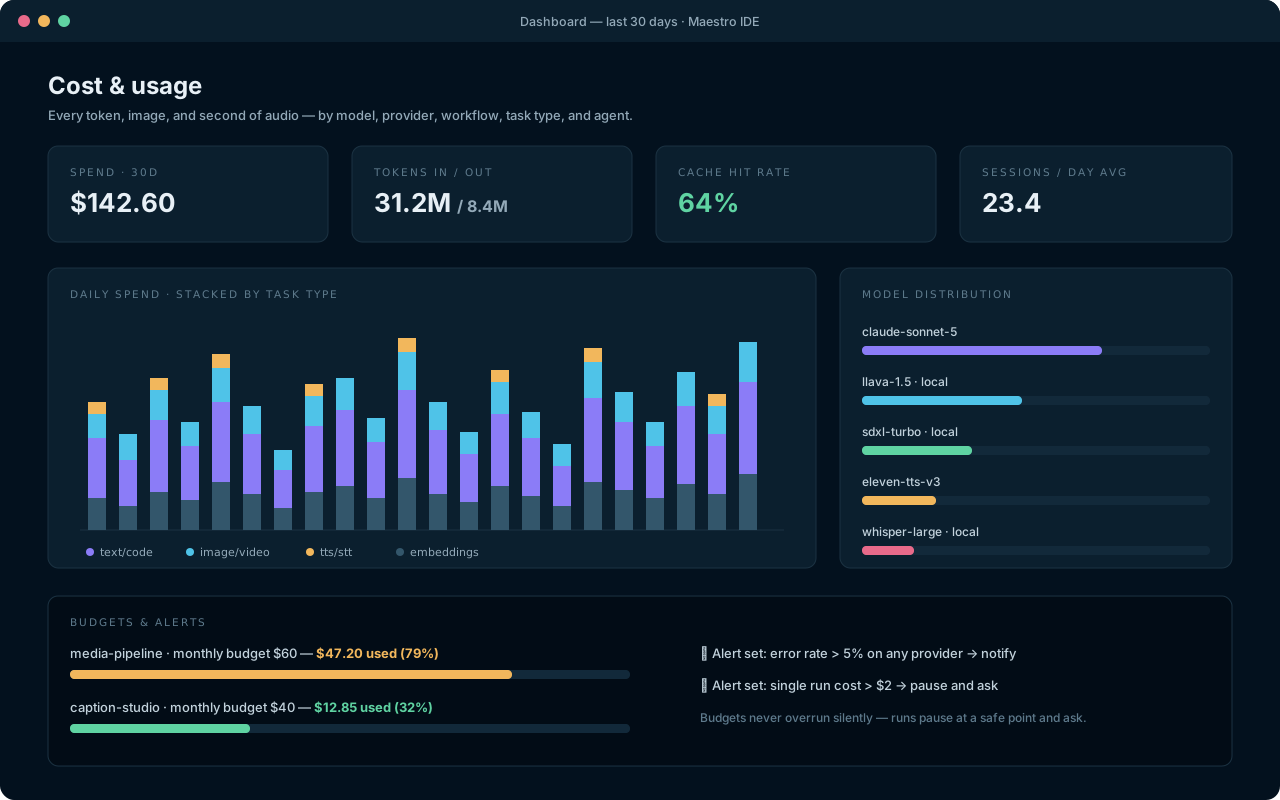
Dashboard: 30-day stacked spend by task type, model distribution, cache hit rate, budgets and alerts
Spend by model, provider, workflow, task type, and agent — with cache hit rates and 30-day trends.
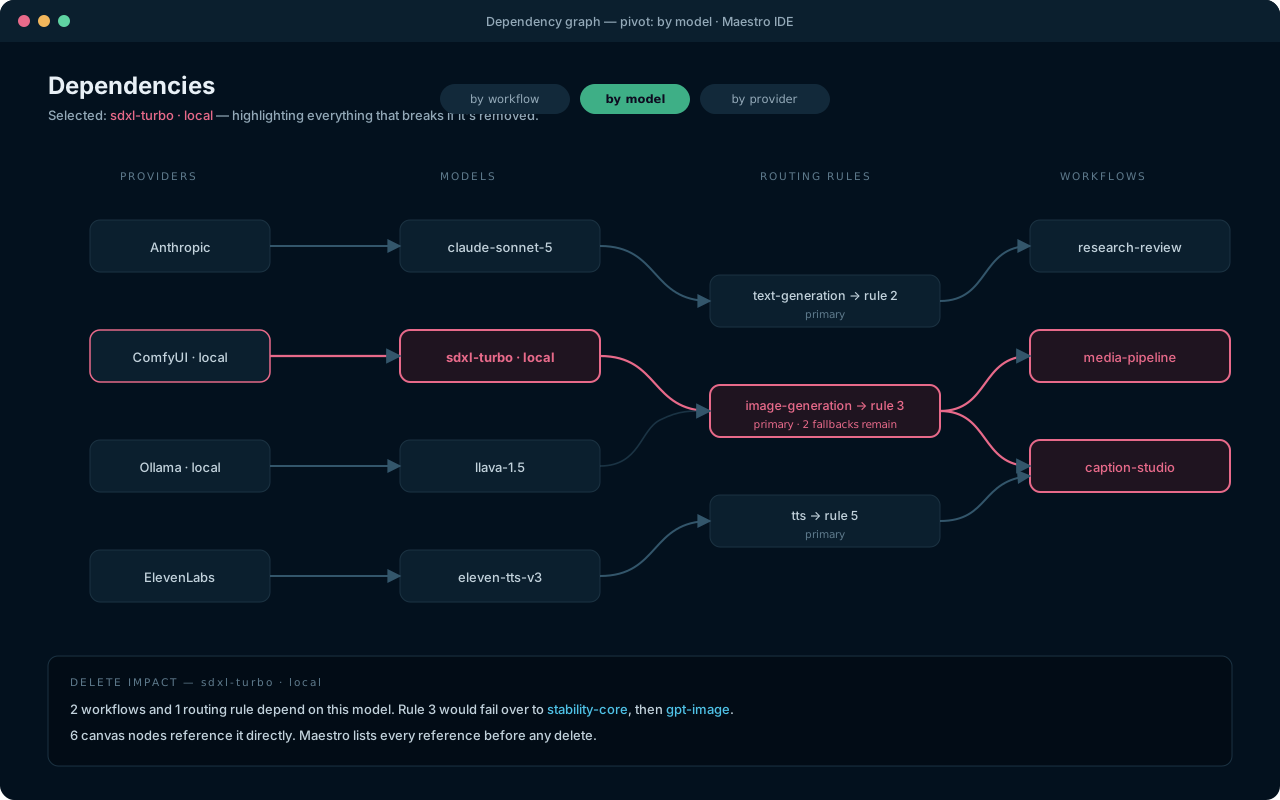
Dependency graph highlighting what breaks if a model is deleted
“What breaks if I delete this?” — answered before you delete it.

Budgets that pause, not surprise

Token, cost, and time budgets per agent and per run. On breach, the run pauses at a safe point and asks — overruns are never silent.

Outbound transparency

A per-run list of every external endpoint contacted, with payload sizes. Local-only setups make zero non-provider network calls.

Alerts

Set thresholds on run cost, error rate, or latency and get notified in the app — and, once the gateway lands, on any channel you’ve connected.

The agent platform · Phase 2 In development

From IDE to companion.

Phase 2 adds the layer that makes agents feel less like scripts and more like colleagues — specified in the same public blueprint, built in the same staged way.

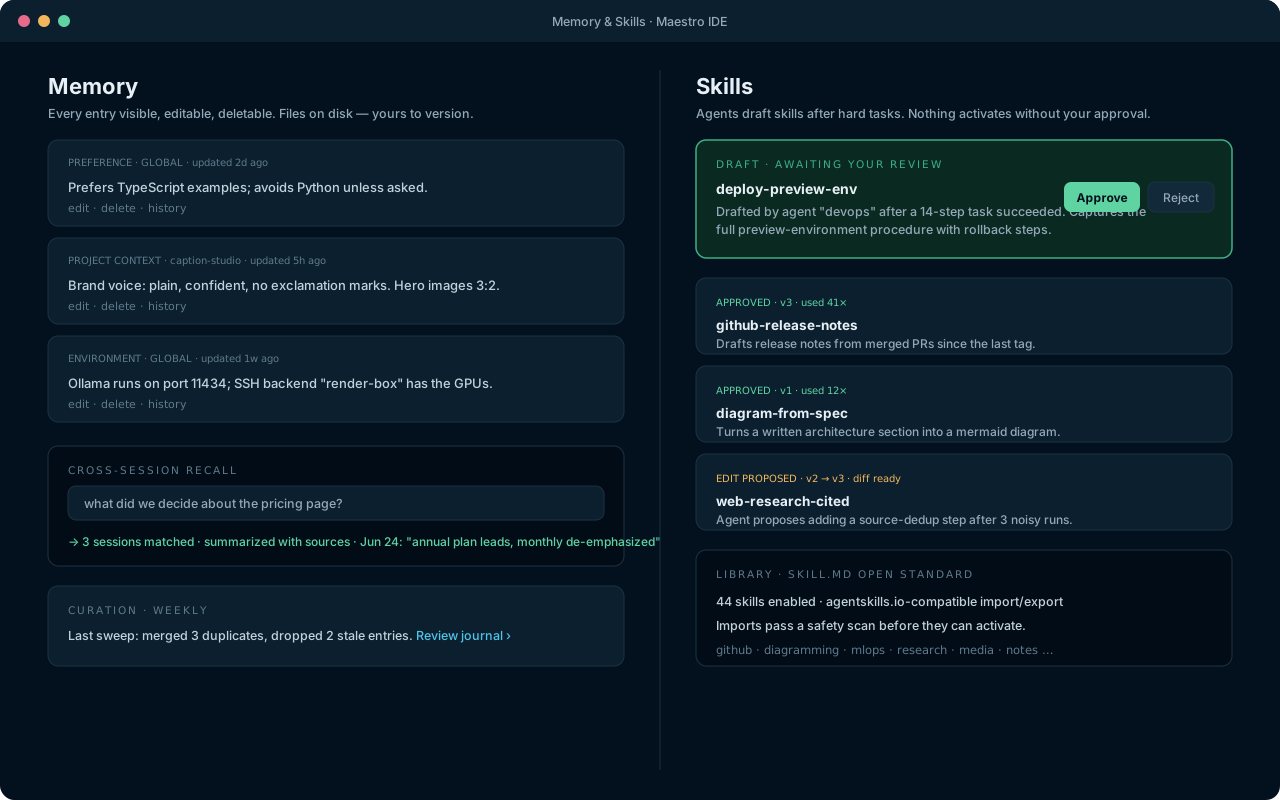
Memory entries with edit controls, cross-session recall search, and a skills review queue
Memory & skills — transparent, file-based, human-approved.
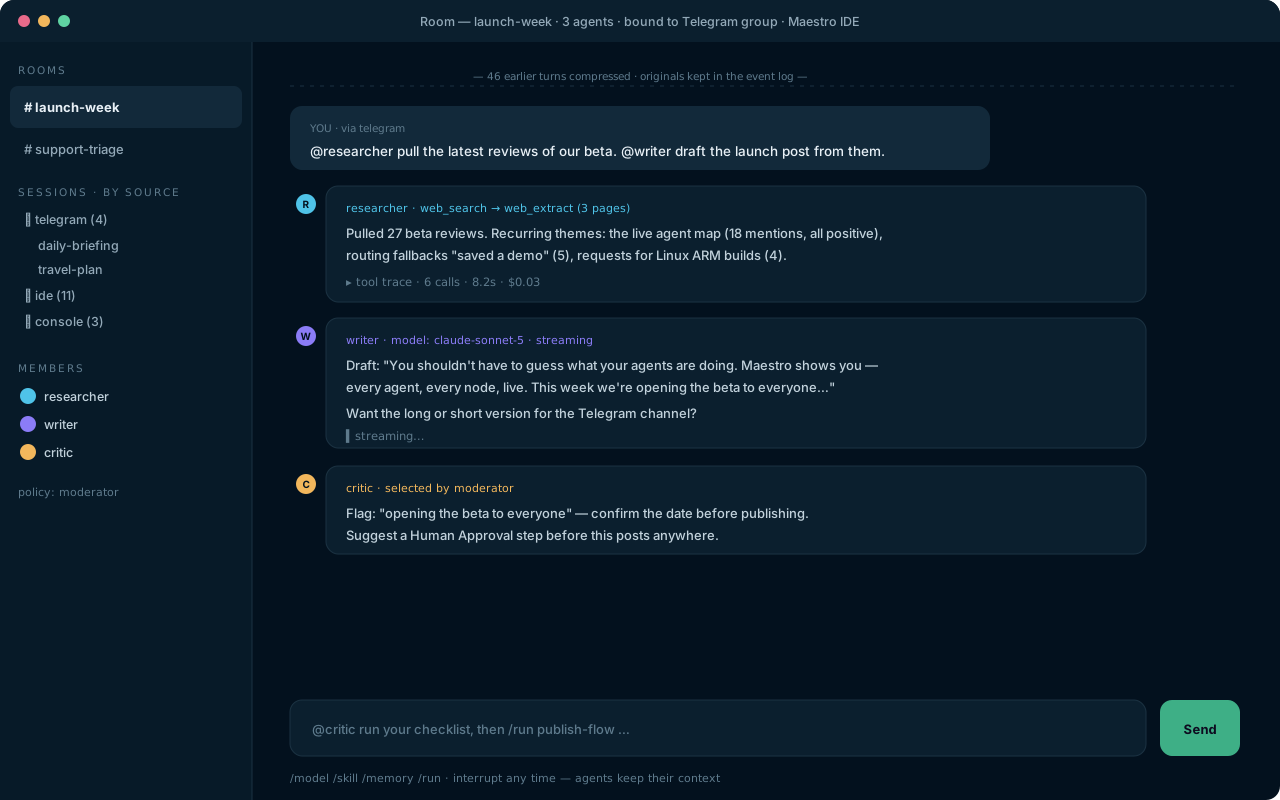
Multi-agent room with researcher, writer and critic collaborating under moderator routing
Rooms — collaborative conversations that can become workflows.

Persistent memory

Agents remember preferences, project context, and your environment across sessions. Entries are plain files — visible, editable, deletable, versionable. Full-text recall over every past session, summarized with sources.

Skills with an approval gate

After a hard task succeeds, the agent drafts a reusable SKILL.md (agentskills.io-compatible). You review and approve before it ever activates. Skills version themselves and propose their own improvements — as diffs, for you to accept.

Multi-agent rooms

@mention a specific agent or let a moderator route. Shared context compresses automatically when it outgrows the smallest model's window — losslessly, with the originals kept in the event log.

Messaging gateway

Telegram, Discord, and Slack first; Matrix and more behind a documented bridge contract. Pairing codes gate access; voice memos are transcribed through your STT route; conversations continue across surfaces.

Schedules & headless service

Describe a schedule in plain language, confirm the parsed cron, pick a delivery channel. The background service runs it — and honors the same budgets, sandbox, and approval rules as the IDE.

Execution backends

Local, hardened Docker (read-only root, dropped capabilities, no network unless granted), SSH remotes, and cloud sandboxes — selectable per project, overridable per node, logged per tool call. Plus a file browser over all of them.

Browser & web tools

Search, extract pages to clean markdown, and drive a real browser — navigate, click, type, screenshot — with vision analysis closing the loop and hard rules against touching credentials or payment fields.

Chat surface, voice in and out

A first-class chat panel with streaming tool traces, interrupt-and-redirect, and /model switching mid-conversation. Speak to your agents and let them answer aloud — through whichever STT and TTS models your matrix routes to.

Profiles, accounts & web console

A self-hosted service with real accounts, roles, and isolated profiles — plus a browser console for chat, runs, jobs, files, and dashboards. No default passwords, localhost by default, TLS for anything wider.

Trajectory export

Batch-run a workflow over a dataset and export the tool-call trajectories as ShareGPT or JSONL, curated by outcome or reward score. Your best runs become training data for your next model.

MCP integration

Attach any Model Context Protocol server — stdio or HTTP — and its tools join your agents' toolboxes under the same allowlists, sandbox, and approval policies.

CLI

The same core, headless: maestro chat, maestro run, maestro jobs, maestro doctor. One service, one event log, many surfaces.
See it in practice.

The how-to guides walk through each of these, step by step.